Two front doors, and neither is a login page
FlowIQ is on the App Store, Google Play and Claude and ChatGPT (via MCP)
 Kiah Thandi SaaimanLast updated11 Sep 2026AI Agents5 min read
TL;DR: Two things went live this week. FlowIQ is on the App Store and Google Play, so your inbox, your agent and your tickets are in your pocket. And FlowIQ now has an MCP server, which means Claude, ChatGPT and any MCP-compatible agent can connect straight to your account and do real work in plain English: pull a report, build a segment, send a campaign, update your agent's instructions. Anything that changes what a customer sees waits for you to say yes first. They look like two releases. They are one idea: for twenty years we went to the software. Now the software comes to you.
It is 8pm. You are in Claude, planning tomorrow. You need one thing from FlowIQ: how many people joined the list this month.
The old answer is a small ritual. Open a tab. Log in. Find the report. Read the number. Close the tab. Go back to what you were doing.
The new answer is: ask.
That is one of two front doors to FlowIQ that opened this week. The other is the one you would expect, the app on your phone. I want to walk through both, because on the surface they are unrelated releases, and underneath they are the same idea.
1. For twenty years, we went to the software
Think about how much of your working day is spent travelling to where the information lives.
Not physically. Just in tabs. The orders are in one place. The conversations are in another. The report you need is three clicks deep in a dashboard you only open on Mondays. Each trip is short. Together they are most of the day.
We stopped noticing this because there was never an alternative. Software lived somewhere, and you went there. That was simply what using a computer meant.
But here is the interesting part. The two things that changed most about how people work in the last few years, the phone in your pocket and the AI assistant in your browser, both point in the opposite direction. They bring things to you. Nobody goes to their phone. Nobody goes to Claude. They are already open.
So the question for anyone building software is no longer just "what can it do?" It is "where does it show up?"
2. Front door one: your pocket
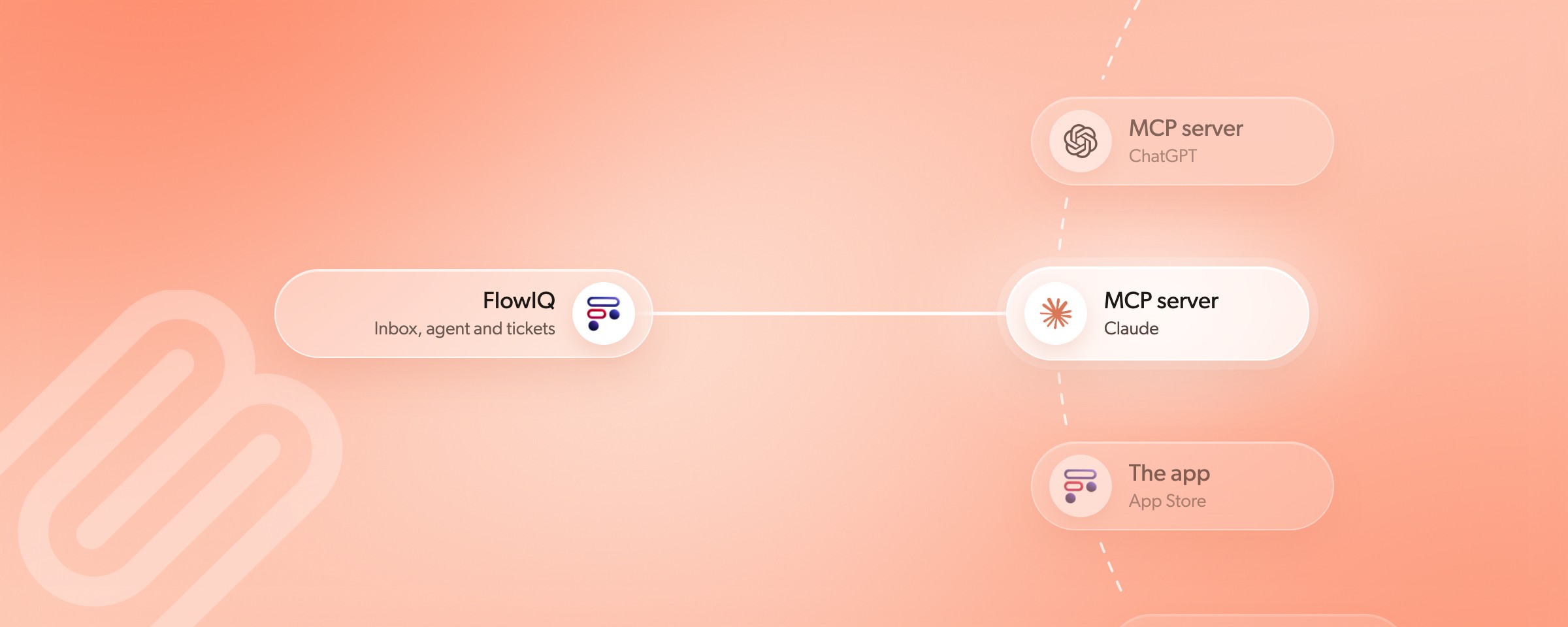
The FlowIQ app is now on the App Store and Google Play.
It is the whole product, not a cut-down version. Every channel in the one inbox: WhatsApp, Instagram, Messenger, email, and your Shopify or WooCommerce orders alongside the conversation they belong to. Your AI agent answering in the background. Your tickets, with the status and the summary, so you can pick one up from the car park without reading the entire thread.
The part I find myself using most is the quiet part. When the agent hits something it should not answer alone, a damaged parcel, an angry customer, a question about a refund, it opens a ticket, tells the customer a person is on the way, and steps back. That moment now arrives as a notification. You see it. You tap it. You are in the conversation.
Which is the point. Most of the moments that need a human do not happen at a desk. They happen at 7am, or in the queue at the post office, or on a Saturday. The app puts the inbox where those moments actually are.
3. Front door two: the AI you already use
The second door needs a little more explaining, so let me try it the way I would to a friend.
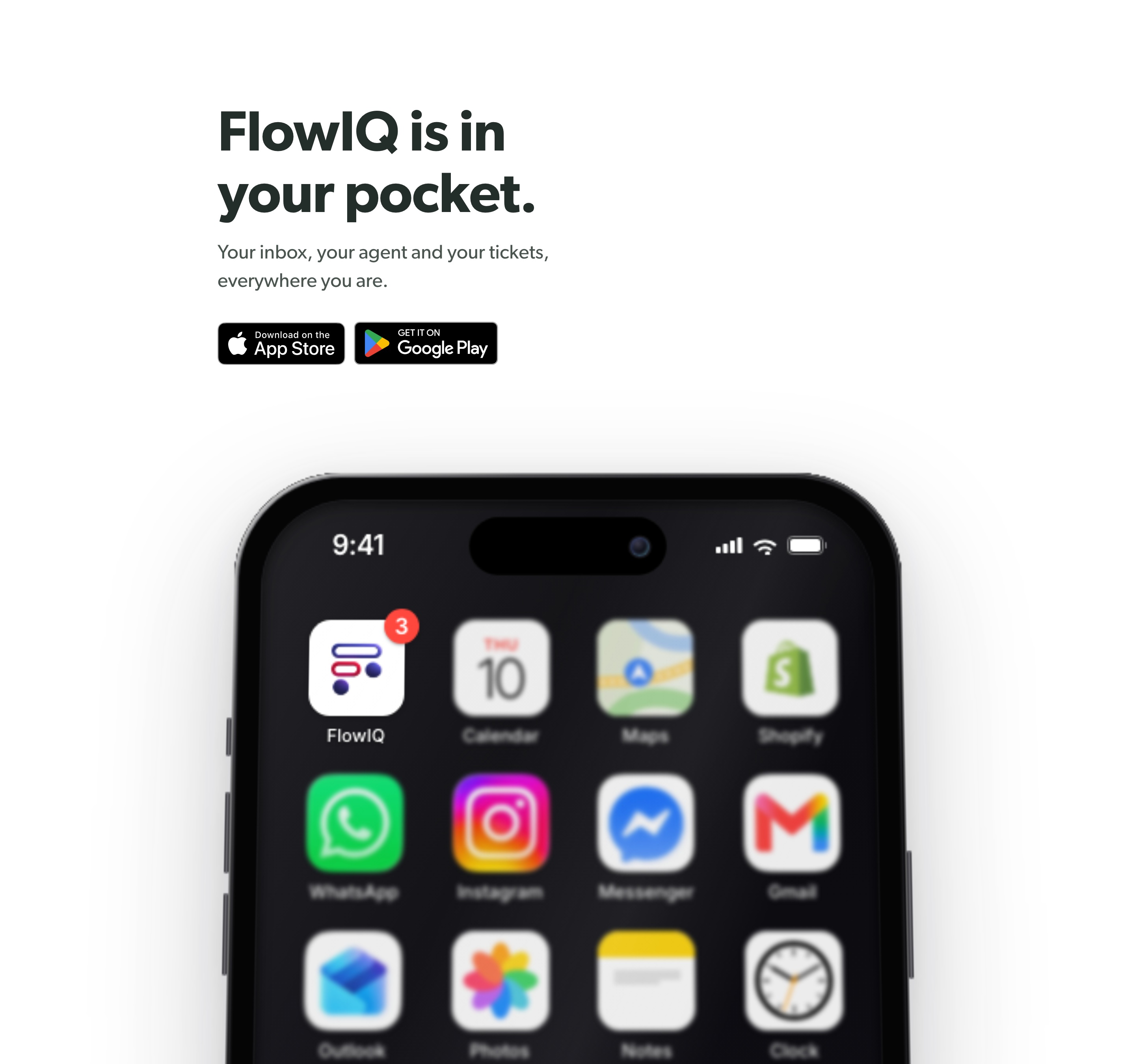
MCP stands for Model Context Protocol. It is a plain, open standard that lets an AI assistant use another piece of software on your behalf. Claude supports it. ChatGPT supports it. Most of the serious AI tools do now. Think of it as a set of hands the assistant can borrow.
FlowIQ now has an MCP server. Connect it to your account, and Claude or ChatGPT can see your contacts, your conversations, your campaigns, your tickets and your agent's own instructions, and do things with them. Not by pretending to click around a screen. Through a proper, named set of actions we built for exactly this.
So you type something ordinary, and it does the work.
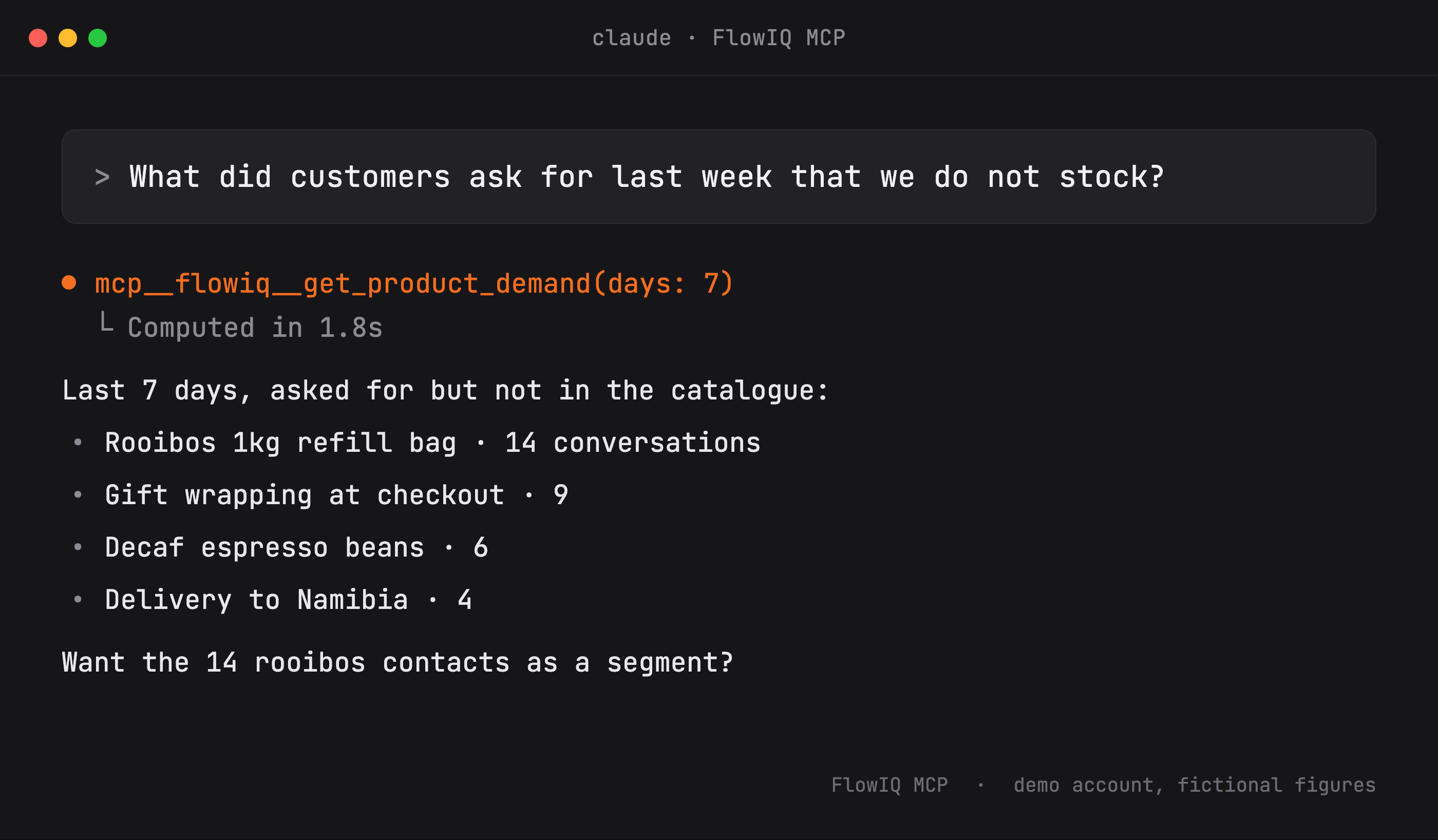
4. What people actually ask
When we switched this on for the first accounts, the requests were not clever. They were the questions people had always wanted answered and never had time to go and look up.
What did customers ask for last week that we do not stock? How did our AI agent perform last month? Did we get any Instagram messages from influencers yesterday? What is our average response time after an escalation? Which campaign brought in the most orders this month? How many abandoned carts did we recover today?
Then, once the reading feels normal, the doing starts.
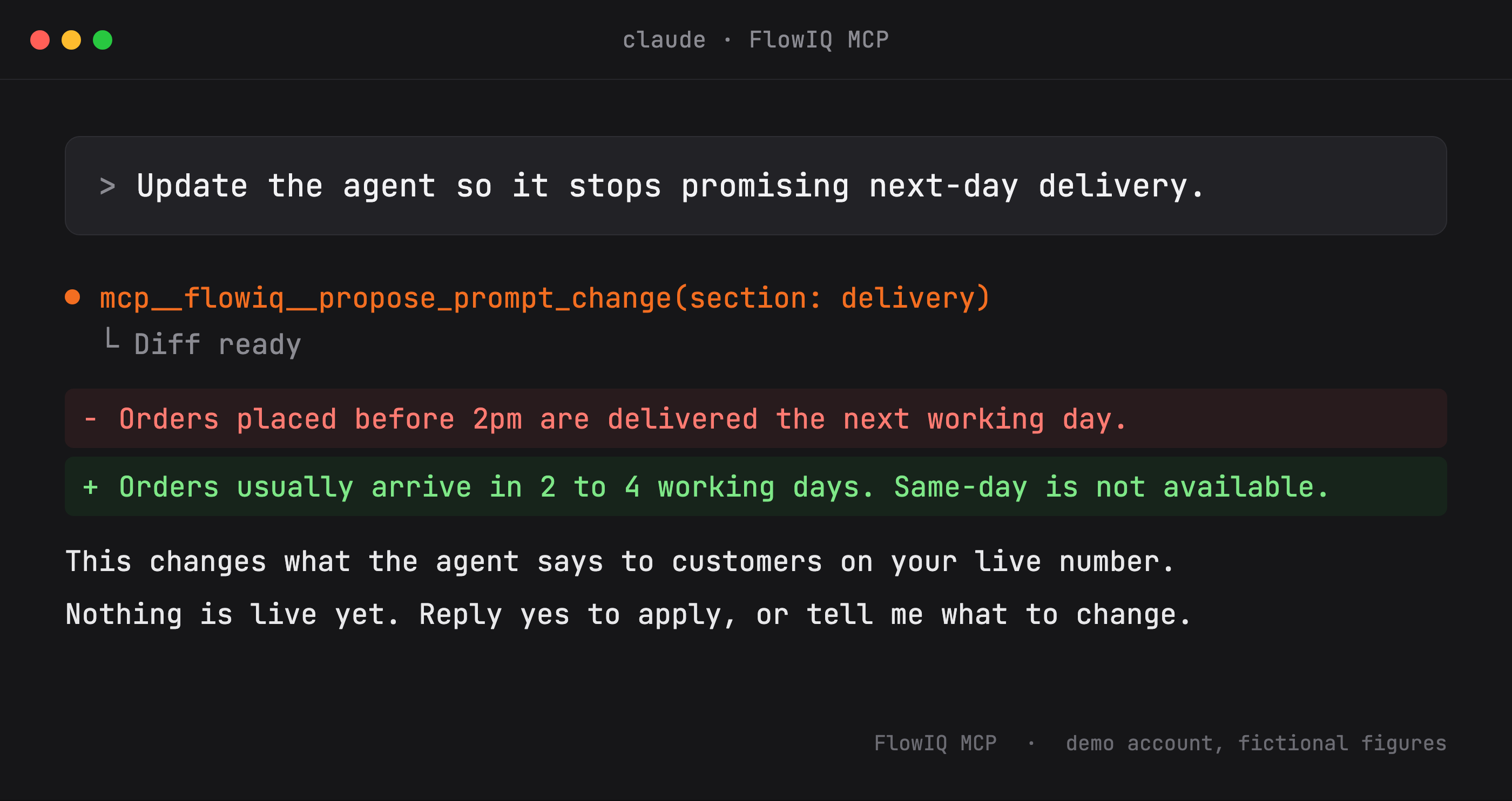
Build a segment of everyone who has ordered twice, but not in the last 100 days. Send the Heritage Day campaign to them. Create a replenishment flow for three months after purchase. Send a discount code to everyone affected by the courier delays this week. Update the agent so it stops promising next-day delivery.
Every one of those is a real thing the connection can do today. And every one of them used to be a trip to the software.
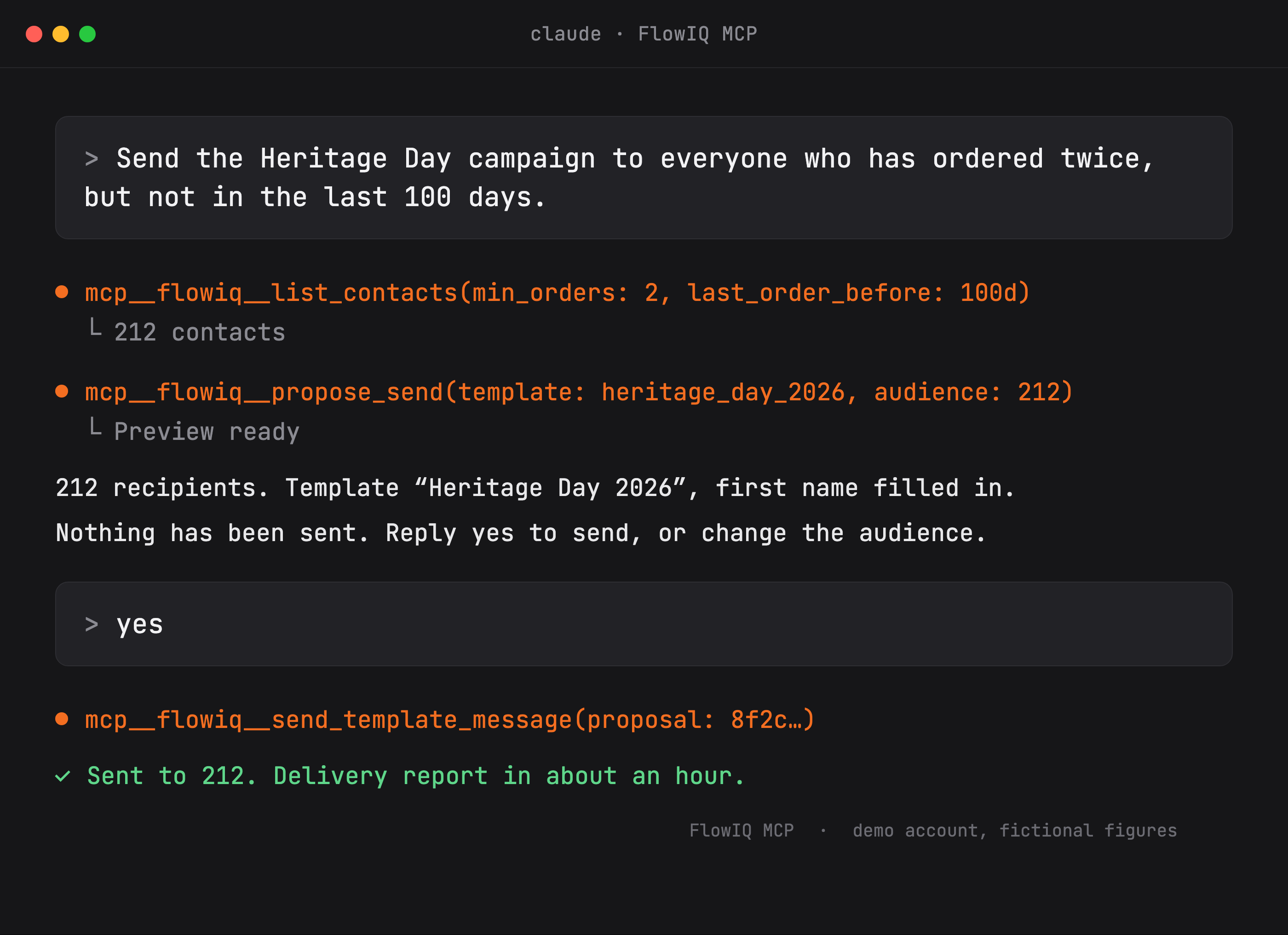
5. It waits for you to say yes
This is the part I would want to know if I were reading this as a customer, so I will be plain about it.
Reading is instant. Ask for a report, a contact's history, a ticket, a broadcast's numbers, and you get them.
Changing things is two steps, on purpose. Anything that sends a message to a customer, or changes what your agent says on your live number, first shows you exactly what will happen. The audience and its size. The template. The diff of the instruction it wants to change. Then it stops and waits. Nothing goes out until you say yes to that exact thing.
A WhatsApp message cannot be recalled. An agent instruction is live the moment it changes. Those two facts shaped the whole design. An assistant that could send on its own would be faster, and nobody would trust it, and they would be right not to.
What surprised me is how natural the pause feels. You describe the change. You look at it. You say yes. It is closer to how you would brief a person than to how you use a dashboard.
6. Why these are the same release
Put the two side by side and the pattern is hard to miss.
The app takes FlowIQ to the place you already are when you are away from a desk. The MCP server takes FlowIQ to the place you already are when you are at one. Neither asks you to go anywhere. Both meet you where the work is happening.
For a long time, a product's front door was its login page. You arrived, you did your work inside, you left. I think that is quietly ending. The products that matter are becoming the ones that show up inside the phone, inside the assistant, inside the conversation you were already having.
Same FlowIQ behind both doors. Same inbox, same agent, same tickets. Just fewer trips to get there.
Maybe that is the whole shift. Not smarter software. Closer software.
Key Takeaways
- For twenty years, using software meant going to the software. Open the tab, log in, find the screen. That habit is so old we stopped noticing it was a habit.
- The app is the obvious half. Every conversation, every ticket and your agent's handoffs, on your phone, with notifications for the moments that need a person.
- MCP is the less obvious half. It is a plain standard that lets an AI tool like Claude or ChatGPT use FlowIQ on your behalf. You describe what you want. It does the clicking.
- The questions people actually ask are simple ones. What did customers ask for that we do not stock? How did the agent do last month? Which campaign brought in the most orders? Those are now one sentence away.
- Reading is instant. Changing things is two steps. Anything that sends a message or alters what your agent says shows you exactly what will happen and waits for your yes. That is not a limitation. It is the whole reason you can trust it.
- Both releases move the work to wherever you already are. That is where software is heading, and it is worth noticing while it is still new.
Frequently Asked Questions
- Where do I get the app?
- Search for FlowIQ on the App Store or Google Play. Sign in with the same account you use on the web. Everything in your inbox, your tickets and your agent is already there.
- What is MCP, in one sentence?
- An open standard that lets an AI assistant like Claude or ChatGPT use another piece of software on your behalf, through a named set of actions rather than by clicking around a screen.
- Do I need to be technical to use the MCP server?
- No. Connecting it is a one-time setup we walk you through. After that you type ordinary sentences into Claude or ChatGPT. If you can describe what you want to a colleague, you can ask for it here.
- Can it send messages to my customers without me?
- No. Anything that sends a message or changes what your agent says first shows you exactly what will happen, including the size of the audience, and waits for you to confirm that exact change. Reading data is instant. Changing things always pauses for your yes.
- Which AI tools does it work with?
- Claude and ChatGPT today, and any other agent that supports MCP. The standard is open, so the list grows on its own.
- How do I switch the MCP connection on for my account?
- Message us. We turn it on per account, give you the connection details, and make sure the first few requests do what you expect.
Ready to stop going to the software?
Get FlowIQ on the App Store or Google Play, and ask us to connect Claude or ChatGPT to your account. Same inbox, same agent, same tickets. Just wherever you already are.
Get a free demo- FlowIQ on the App Store and Google Play
- Connect Claude or ChatGPT to your account
- Anything that sends a message waits for your yes